
Description
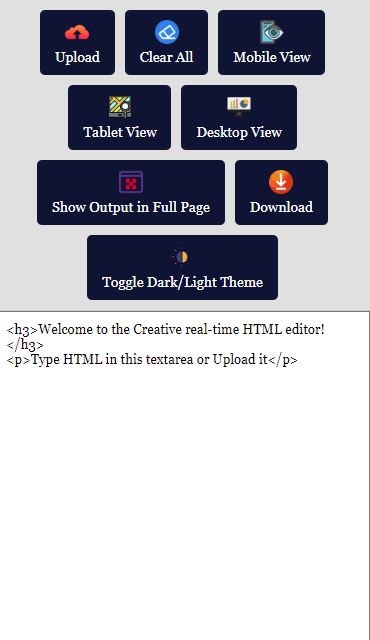
Altratom Real Time HTML Editor is a real time HTML editor that shows your page update live as you type.
Boost your development efficiency with this feature-packed Real-Time HTML Editor! Designed for web developers and designers, this powerful editor enables you to write, edit, and preview HTML code in real time.
The editor comes with a fully responsive preview mode that allows you to instantly switch between mobile, tablet, and desktop views, ensuring your designs look perfect on all screen sizes. Additionally, with built-in file upload support, easy download options, and a customizable dark/light mode, this editor offers everything you need to streamline your workflow.
Key Features:
Real–Time Editing: See your HTML updates live as you type.
Responsive Previews: Quickly preview your code in mobile, tablet, and desktop views.
File Upload Support: Upload your own HTML files for easy editing and modification.
Download HTML Files: Save your progress with one-click file download.
Dark/Light Theme Toggle: Switch between dark and light modes to reduce eye strain.
Clear All Button: Reset your editor with a single click.
Customizable Interface: Flexible layout and easy-to-use button controls.
Cross–Browser Compatible: Works seamlessly across modern browsers.
Perfect for web developers, designers, and students looking for a robust and user-friendly real-time HTML editor to accelerate their projects.
Altratom Real Time HTML Editor FAQ
Can I see how my page looks on phones?
Yes. Switch instantly between mobile, tablet and desktop previews while you edit.
Can I work on my existing HTML files?
Yes. Upload your own HTML files to edit them, then download the finished file.
How do I get support?
Altratom customers can submit a support ticket from their Altratom customer account.
Why use a real time HTML editor
Writing HTML blind means saving, refreshing and checking again and again. A real time HTML editor removes that loop: the preview updates the moment you type, so you spot a missing tag or a broken layout straight away. It is handy for building landing pages, tweaking email templates or testing a snippet before you paste it into WordPress. See also how to preview landing pages on mobile, tablet and desktop before launch.

Reviews
There are no reviews yet.